Product Function
Understand terminal functions, modules, interfaces, and configurations.

SUNTEK Technical Support
SDK, integration, and engineering support for SUNTEK smart terminal projects.
SUNTEK technical support helps software teams, system integrators, and project partners integrate smart terminal hardware with SDK resources, developer documentation, remote assistance, and deployment guidance.
Resources for selected hardware modules
References for approved integration projects
Firmware, systems, interfaces and peripherals
Online guidance during testing
Coordination for qualified projects
Support for project teams
SUNTEK provides technical resources to help project teams integrate selected smart terminal hardware modules through SDK, API, driver, and interface documentation.
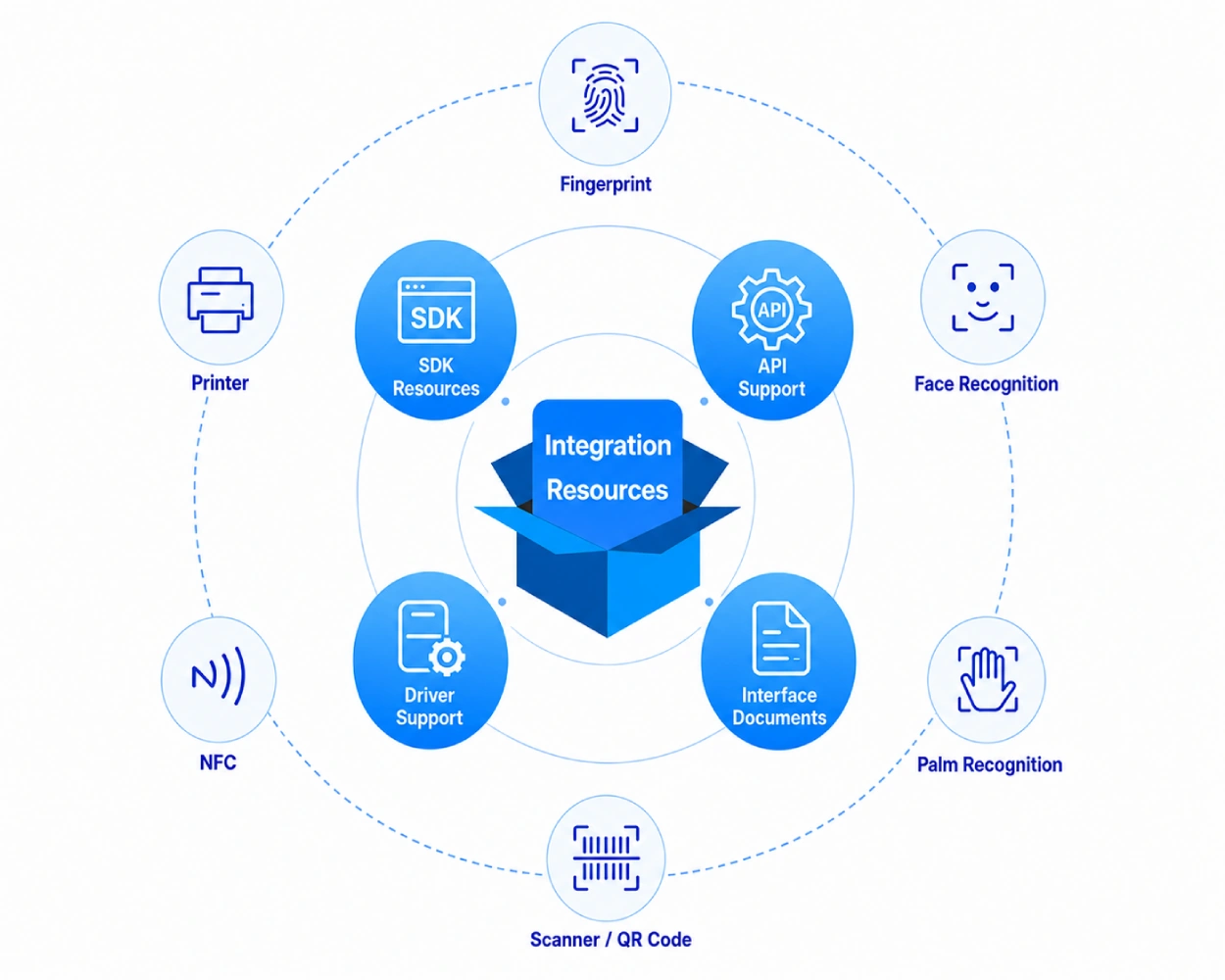
Integration methods depend on the product model, module configuration, peripheral interface, and project requirements.
SUNTEK helps project teams coordinate device configuration, peripheral connection, firmware communication, and deployment requirements for smart terminal projects.
Confirm device settings, module options, and project-specific hardware requirements.
Coordinate printers, scanners, NFC readers, biometric modules, ports, and accessories.
Discuss firmware needs, device behavior, function adaptation, and project adjustments.
Support rollout planning, remote configuration, MDM requirements, and delivery communication.
Hardware, software, peripherals, firmware, and deployment teams aligned before rollout.
SUNTEK provides dedicated technical team support, remote assistance, engineer communication, and local service coordination for selected smart terminal projects.
Submit model, project background, and support request.
Confirm device details, issue type, and timeline.
Technical specialists follow up on project and integration questions.
Support testing, troubleshooting, and configuration checks.

Coordinate local service for selected deployment projects.
SUNTEK provides technical training support to help project teams understand product functions, integration requirements, device setup, and deployment preparation for smart terminal projects.
Understand terminal functions, modules, interfaces, and configurations.
Learn how SDK, API, driver, and interface documents support integration.
Support configuration, parameter settings, testing, and preparation.
Prepare rollout workflows, checklist reviews, and project handover.

Operation and configuration guidance.
Integration and interface explanation.

Technical material and project support.
Setup, testing, and rollout support.
SUNTEK provides technical support across smart terminal product categories, including POS terminals, self-service kiosks, facial recognition terminals, AI boxes, payment devices, printers, and related commercial hardware.
Support for desktop POS, mobile POS, peripherals, payment-related hardware, and project configuration needs.
Support for kiosk configuration, module selection, printer, scanner, NFC, biometric, and deployment needs.
Support for access control, attendance, identity verification, interface communication, and project setup.
Support for edge AI hardware, system configuration, local processing, peripheral connection, and project integration.
Support for QR payment devices, cloud sound box hardware, connectivity, platform communication, and device setup.
Support for printer functions, driver communication, cloud printing, interface confirmation, and application integration.
Need support for a specific product model or project configuration?
Contact Technical SupportPrepare key project information before contacting SUNTEK technical support.
Clear information helps SUNTEK engineers evaluate the request faster.
Model name, product category, and hardware configuration.
Application scenario, country, quantity, and project stage.
Software platform, application status, and required functions.
Technical issue, expected function, or support request.
Screenshots, videos, logs, photos, or project documents.
Testing schedule, rollout plan, or target delivery date.
Complete details help engineers confirm the support direction earlier.
Clear model, software, and issue details improve communication.
Contact SUNTEK technical support for SDK resources, integration questions, device configuration, remote assistance, training, or project-level technical communication.